


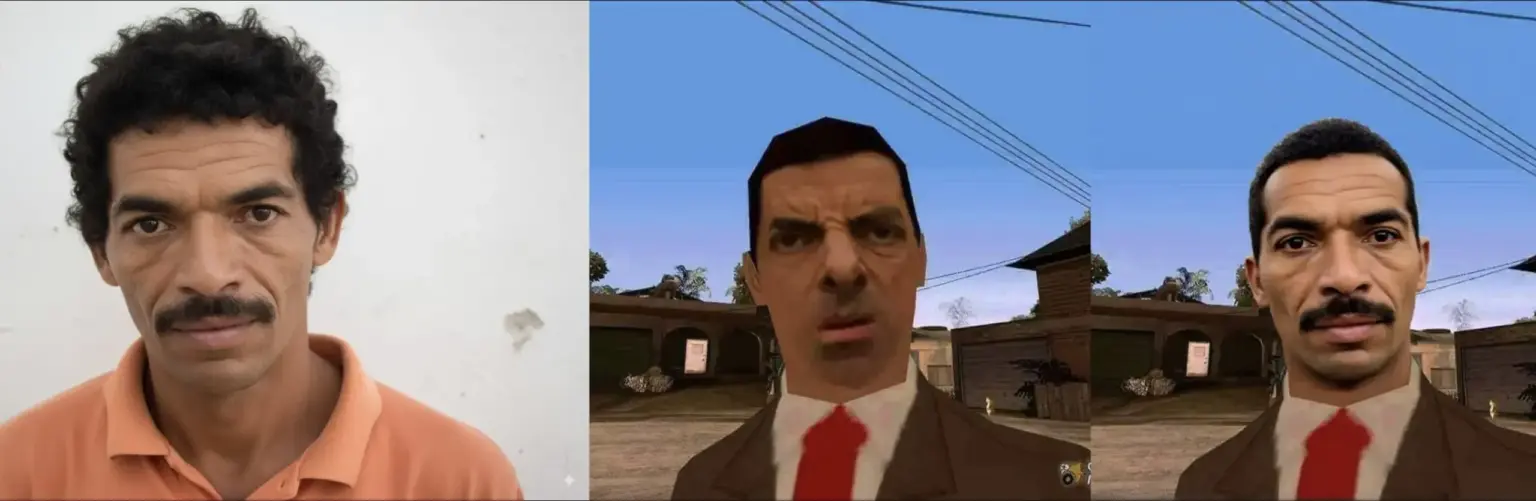
I am using a LoRA called BFS which stands for Best Face Swap. It is trained for face swap and head swap on top of Qwen Image Edit 2509. The author trained it on 240 image triplets that include face, body, and the final result. They started with LoRA rank 16 and moved to 32, used gradient accumulation 2, and trained for about 5,500 steps on an NVIDIA L40S. The idea is simple. You keep the body and scene from one image, and you bring in the face or the full head from another image. The swap looks natural. It keeps eye direction, expression, and lighting so it blends in.
Qwen Image Edit 2509 itself is the base model that does strong image editing and multi image work. It is the 2509 release from the Qwen team and it is available as an official model and demo.
How it works
I load two pictures to start. One picture has the face I want to use. The other picture has the body and the scene where the swap will appear. When I want tighter control over posture, I add one more picture that shows the pose I am aiming for.
In ComfyUI, I open Qwen Image Edit 2509, add the BFS LoRA, and set a mask over the face area. If I need a full head swap, I make the mask wider so it covers hair and the head outline. If MediaPipe Face or Planar Overlay gives trouble, I switch to DwPose to keep the eyes, nose, and mouth in the right place. Then I run the graph and check the blend. If the skin tone or edges look off, I adjust the mask size, raise steps a little, or try a new seed and render again.
What you have to install
- ComfyUI updated to a recent build. This avoids encoder errors and missing node issues people report when they use old installs.
- Qwen Image Edit 2509 as the base model. You can test it in the official Space or pull it from the model page.
- BFS LoRA for face swap and head swap. The author shares the LoRA file and a ready workflow in the release posts.
Settings that work
These come from the author’s guidance and my tests.
- Samplers that feel good:
ddim with ddim_uniform
er_sde with beta57 or kl_optimal
res_2s with beta57 - Precision choices:
Best quality is fp16.
Good and lighter are gguf q8 or fp8.
Below fp8 you will see a drop in quality. - Steps and CFG:
If you also load a Lightning 4 step LoRA, use 4 steps for speed.
Without Lightning, use 20 to 25 steps and CFG 1.5 to 2.5 for sharp, real looking swaps.
If you see strange eyes, try CFG 3.5 or change the seed and run again. - Heads up about texture:
Lightning LoRA can push skin into a plastic look, more so when you stack it with new Qwen 2509 LoRAs. If that happens, turn Lightning off and render again.
When to use face swap and when to use head swap
- Face swap is enough when hair, head shape, and ear area in the target already match your scene.
- Head swap is better when the haircut or head outline must change along with the face. In that case, use a wider mask or a head mask and let the model replace hair and edges too.
A simple prompt plan
Keep it short and clear.
- Say what to keep from Image 2, like outfit, lighting, and camera angle.
- Say what to take from Image 1, like identity and expression.
- If you add Image 3, say you want to copy the pose from Image 3.
Example line I use:
“Keep outfit and lighting from Image 2. Keep identity and expression from Image 1. Copy the pose from Image 3. Keep the same skin tone as Image 2.”
Download links
- BFS Face Swap LoRA release post with the LoRA file and notes from the author. Click Here
